Hatchway Age Gate · Guide
Find and export age-check records on Shopify
Hatchway Pro provides age-check lookup by reference and CSV exports by date. A record describes a confirmation, not proof of age or a completed purchase.
What a record contains
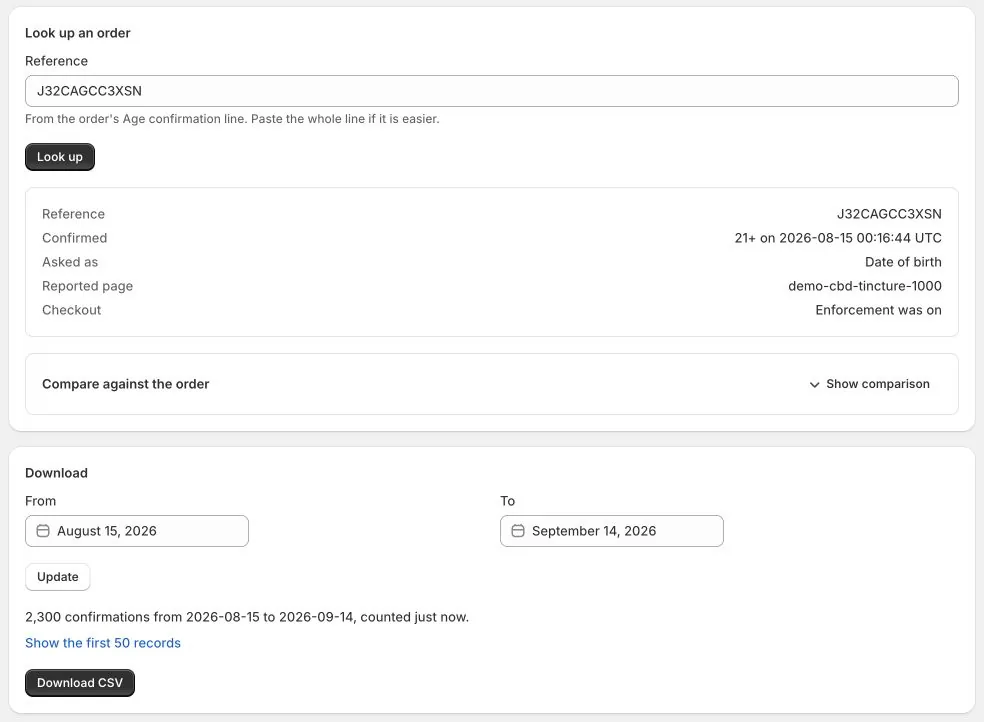
A lookup shows the confirmation time, age threshold, confirmation method, reported page when available, and checkout enforcement context.
The ledger records confirmations even when checkout enforcement is off. It does not read or automatically reconcile your Shopify orders.
Enable references on future orders
Order references are optional and off by default. On Pro, enable the order-record setting before a confirmation you want to reference on an order.
- Enable the order-record setting in Hatchway.
- Complete a fresh age confirmation on a restricted product in a development store.
- Complete a test order and find its age-check reference in Shopify.
- Open Ledger, paste the reference into the Reference field, and look up the record.
Enabling the setting does not add references to historical orders. The reference lookup is a manual connection you make, not an automatic order audit.
Export records for a date range
Open Ledger, choose the dates in Download, update the range, and select Download CSV. Use the exported records for your own review.
Records have a retention window. Read the available dates and any limits shown in the app, and export what you need before it expires.
What the ledger does not establish
- It does not verify the shopper’s identity or whether their declaration was true.
- It does not prove an order completed or that every order has a corresponding record.
- It is not a tamper-evident certification or a guarantee of legal compliance.
Use records with deliberate enforcement
Pro enforcement is a separate opt-in. When enabled, it checks for a valid confirmation on restricted Online Store purchases. A record alone does not enable that rule.
Read how checkout enforcement works, or compare Hatchway plans.